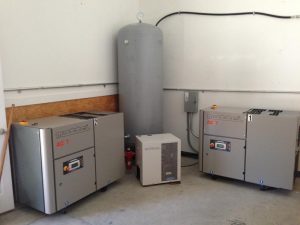
Paint-shop air dryer troubleshooting should begin by locating and timing the warning before treating the dryer as the cause. Liquid in a regulator bowl, a rising dew-point display, or an alarm may reflect dryer performance, but it may also involve changing load, inlet or ambient conditions, drains, treatment components, or cooling farther downstream.
That distinction matters because a symptom recorded only as “dryer bad” can send service toward the wrong equipment or erase the operating conditions that made the problem visible. A comparison with a stable production period is more useful than a single reading taken after the shop quiets down.
Operators can build that comparison from normal-access evidence: controller history, installed gauges, active air users, external indications, model information, and maintenance records.
Placed on one air-path timeline, those facts give qualified service a focused starting point without asking operators to diagnose or open pressurized equipment.
Confirm where the warning appears before blaming the dryer
“Wet air” isn’t a location. Write down whether the evidence came from the dryer display, the outlet, a receiver, the main header, a booth drop, or a regulator bowl. Add the date and time, then name the affected branch and the nearest useful comparison point.
Choose that comparison carefully. A dry outlet on another header may see a different temperature and load, so it tells little about the booth branch. A second point on the same documented route is stronger. If routine shop instruments provide a downstream temperature, record it with the measurement point rather than attaching it to the whole system.
The compressed-air moisture and drying basics explain the physical reason. Pressure dew point describes the temperature at which water vapor condenses at the system pressure. Air that leaves the dryer without liquid can release water later if it cools below that temperature. A line that crosses an exterior wall or a cooler bay therefore deserves a place on the air-path sketch.
Keep a rising dryer display, liquid at the booth regulator, and a clear comparison point as separate observations with their own timestamps. That sequence gives service a usable timeline.
Compare the warning with load, inlet temperature, and room conditions
Dryers carry ratings based on stated conditions. Actual capacity can fall when incoming compressed air gets hotter, inlet pressure drops, ambient temperature rises, or flow increases. The DOE compressed-air sourcebook specifically points to inlet temperature and inlet pressure as capacity factors, with manufacturers supplying correction data for their equipment.
Capture those conditions during the warning, not after the shift ends. Use installed instruments and controller history to record dryer-inlet pressure, inlet-air temperature, and room temperature with their timestamps. If the shop has a flow meter, identify its location and reading. Without one, list the equipment that was operating and when loads overlapped; don’t turn motor nameplates into invented CFM.
Recent changes belong on the same timeline. A new air tool, longer booth hours, altered compressor sequencing, a closed compressor-room louver, or warmer weather may separate the warning period from the last stable run. Record the changes alongside the warning rather than selecting one in advance.
A good comparison uses similar production under different conditions. If the display stays steady during a cool morning but rises when booth spraying overlaps other air use on a hot afternoon, preserve both periods. Qualified service can then compare the installed dryer’s exact rating basis and correction data with the recorded conditions instead of relying on a single peak reading.
Check external indicators, drains, and maintenance records
Read the machine before interpreting it. Record the exact alarm message or code, displayed dew-point trend, controller state, and time of each change. Include the manufacturer, model, serial number, and manual revision because familiar words can mean different things on different controllers.
Stay with indicators intended for normal operator access. A status light, external differential-pressure indicator, condensate-discharge signal, or controller trend can add useful context. So can a cooling-air grille that is visibly obstructed from the normal walkway, liquid beneath the cabinet, or an unusual sound heard from the designated operator position. Note the time and operating state.
Maintenance records fill another part of the picture. Match completed work to the exact manufacturer’s instructions and the shop’s operating conditions; generic online intervals shouldn’t replace the installed machine’s manual. Paint Booth’s maintenance calendar can help organize dates and ownership, but the dryer manufacturer sets the applicable task and timing.
If the shop can’t confirm the last prefilter service or upstream-drain work, mark the entry “not found” and list the records checked.
Place current and stable-period entries side by side using the same fields. Matching timestamps, display values, alarm states, drain indications, and operating loads expose a change much more clearly than a folder full of unrelated service tickets.
Separate refrigerated-dryer clues from desiccant-dryer clues
Refrigerated and desiccant dryers remove moisture by different means, so their records should lead to different service questions.
For a refrigerated dryer, group the evidence around heat rejection, refrigeration performance, controls, and condensate removal. Room temperature, dryer-inlet temperature, visible airflow obstruction, ventilation changes, display history, alarms, and external drain indications all belong in that group. Qualified service can compare their timing with the model’s published rating basis and controller information.
A desiccant dryer points elsewhere. External prefilter differential-pressure history and upstream-drain indications help frame questions about prefiltration or liquid carryover. Controller state plus an observed change in purge or regeneration behavior can guide questions about sequencing and valves. Dew-point trends, alarms, the manual, and maintenance history give context for the desiccant condition.
| Installed dryer | Operator record | Questions for qualified service |
|---|---|---|
| Refrigerated | Inlet and room temperatures, pressure, load timing, display trend, alarms, external drain indication | Rating conditions, heat rejection, refrigeration performance, controls, separator and drain operation |
| Desiccant | Prefilter indication, upstream drain status, tower or controller state, purge pattern, dew-point trend, maintenance history | Prefiltration, liquid carryover, purge or regeneration, valve operation, desiccant condition |
A purge change recorded at the same time as downstream moisture carries more information than an undated recollection.
Test the record against two paint-shop operating patterns
The same record works for both dryer types. For a refrigerated dryer, compare a hot, high-demand warning period with a cooler run under similar production. Carry both periods forward with the model data, inlet conditions, display history, alarms, and external drain indication.
For a desiccant dryer, pair the moisture timestamp with controller state, purge or regeneration indications, prefilter and upstream-drain records, and the nearest stable period. A missing maintenance entry remains a history gap, while a timed change in purge behavior describes current operation. Keeping those entries distinct gives the technician a cleaner starting point.
Build the service handoff without opening pressurized equipment
Put the findings in one dated packet. Begin with the dryer’s manufacturer, model, serial number, and manual revision. Add a simple air-path sketch marking the dryer, affected branch, observation points, and stable comparison points.
Then build a short timeline with the fields that matter:
- exact time and location of each moisture report, dew-point change, or alarm;
- active compressors and air users, including the duration of overlapping demand;
- dryer-inlet pressure and temperature, room temperature, and installed flow reading when available;
- controller state, alarm text, trend history, and normal external drain or purge indications;
- recent production, ventilation, piping, compressor, or maintenance changes; and
- work completed under the exact manufacturer’s instructions, with missing entries marked as unavailable.
Photos can show the controller, equipment label, external indicators, surrounding clearance, visible airflow obstruction, and route toward the affected branch. Take them only from normal-access positions and caption each with its time and location. A one-page index prevents the service team from hunting through an unlabeled camera roll.
Finish with questions matched to the installed dryer. For refrigerated equipment, ask qualified service to reconcile the rating conditions, heat rejection, refrigeration performance, controls, and separator or drain evidence. For desiccant equipment, ask about prefiltration, possible liquid carryover, purge or regeneration behavior, valves, and desiccant condition. Send that packet with a request for compressed-air system support instead of ordering a part from the first symptom.
Operator checks stop at normal controls, external indicators, safe observation points, and existing records. Work involving guards, panels, filters, drains, towers, vessels, electrical parts, refrigeration circuits, or pressurized connections belongs to authorized personnel following the employer’s equipment-specific energy-control procedure, verified isolation and stored-pressure relief, the exact manufacturer instructions, and qualified service.
A wet branch or rising dew-point display deserves a response, but the response starts with evidence. Place the warning on the air path and timeline, compare it with a stable period, and keep the refrigerated or desiccant questions matched to the installed machine.
Shops can attach that record when they request a compressed-air system quote, whether the eventual answer is service, an operating change, or an equipment decision supported by the technician’s findings.