

A paint booth filter record is only as reliable as the physical inspections behind it. Checkmarks on a clipboard do not prevent finish defects, fan wheel loading, or airflow imbalance if they fail to capture how media sits in its frame or how differential pressure changes across production shifts.
Treating filter maintenance as an integrated workflow—pairing visual inspection, physical seating checks, and differential pressure tracking—protects finish quality and maintains booth balance. While detailed media selection is addressed in our guide to paint booth filter types, and overall booth upkeep belongs in your shop's paint booth maintenance checklist, this guide focuses on building an inspection-to-action record that helps identify abnormal conditions and track their resolution.
Map Filter Locations and Airflow Roles Before You Inspect
Effective inspection starts with identifying every filter bank specified in your booth drawings and recognizing the mechanical job each performs. Spray booths rely on distinct intake and exhaust filtration zones, and inspecting them requires different criteria.
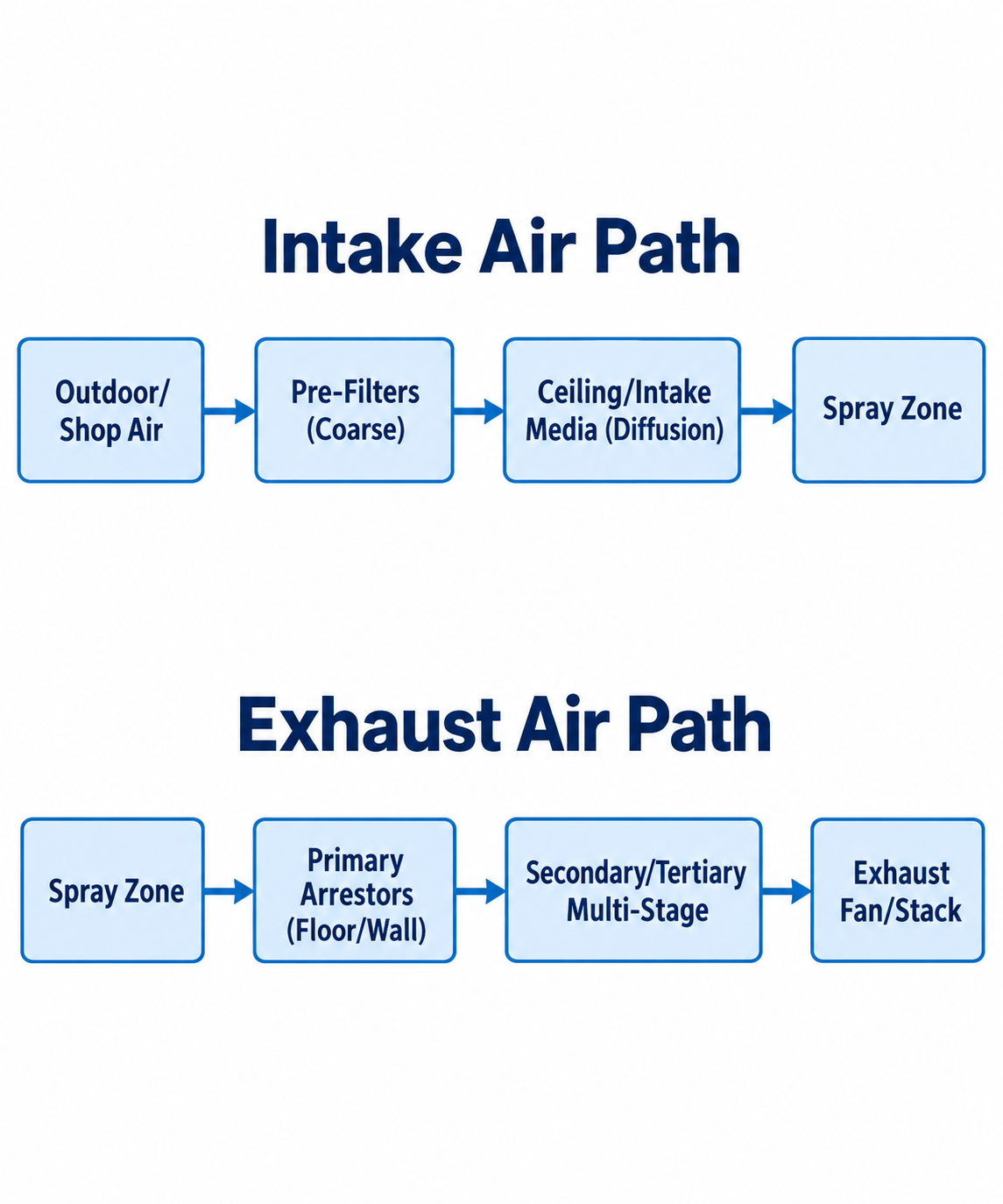
Diagram description
- Intake Air Path
- Outdoor/Shop Air
- Pre-Filters (Coarse)
- Ceiling/Intake Media (Diffusion)
- Spray Zone
- Exhaust Air Path
- Primary Arrestors (Floor/Wall)
- Secondary/Tertiary Multi-Stage
- Exhaust Fan/Stack
- Outdoor/Shop Air → Pre-Filters (Coarse)
- Pre-Filters (Coarse) → Ceiling/Intake Media (Diffusion)
- Ceiling/Intake Media (Diffusion) → Spray Zone
- Spray Zone → Primary Arrestors (Floor/Wall)
- Primary Arrestors (Floor/Wall) → Secondary/Tertiary Multi-Stage
- Secondary/Tertiary Multi-Stage → Exhaust Fan/Stack
- Intake Air Path
- Outdoor/Shop Air
- Pre-Filters (Coarse)
- Ceiling/Intake Media (Diffusion)
- Spray Zone
- Exhaust Air Path
- Spray Zone
- Primary Arrestors (Floor/Wall)
- Secondary/Tertiary Multi-Stage
- Exhaust Fan/Stack
- Two independent chains with headings Intake Air Path and Exhaust Air Path: Outdoor/Shop Air → Pre-Filters (Coarse) → Ceiling/Intake Media (Diffusion) → Spray Zone.
- Spray Zone → Primary Arrestors (Floor/Wall) → Secondary/Tertiary Multi-Stage → Exhaust Fan/Stack.
Intake filters condition incoming air. In a crossdraft or semi-downdraft configuration, intake door filters or upper pre-filter banks knock down large airborne debris before it reaches the cabin. In a full downdraft booth, ceiling diffusion media evenly disperses air downward across the target envelope while filtering incoming particulates according to the specified media performance.
Exhaust filters protect downstream equipment and outdoor emissions. Whether positioned in floor pits, side extraction plenums, or back-wall exhaust chambers, exhaust media captures wet and dry overspray. This prevents paint solids from coating exhaust fan blades, accumulating inside ductwork, or discharging into the atmosphere. Notably, standard dry particulate filters do not capture volatile organic compounds (VOCs) or solvent vapors; their mechanical role is strictly overspray and particulate control.
Before opening filter access doors or pit grates, consult your booth’s manufacturer maintenance instructions. Confirm:
- Specified media grade and dimensions for each stage
- Approved holding hardware (twist latches, compression bars, wire grids, or tension tracks)
- Airflow direction markers printed on the filter media borders or backing
Inspect Condition, Seating, and Differential Pressure Together
Evaluating a filter bank requires examining physical media condition, perimeter fit, and static pressure simultaneously. Relying on any single metric will mislead you. A dark, dirty filter might still hold acceptable airflow with plenty of internal depth capacity remaining. Conversely, a clean-looking filter bank with blown-out perimeter seals will show deceptively low differential pressure while leaking overspray straight into your exhaust plenum.
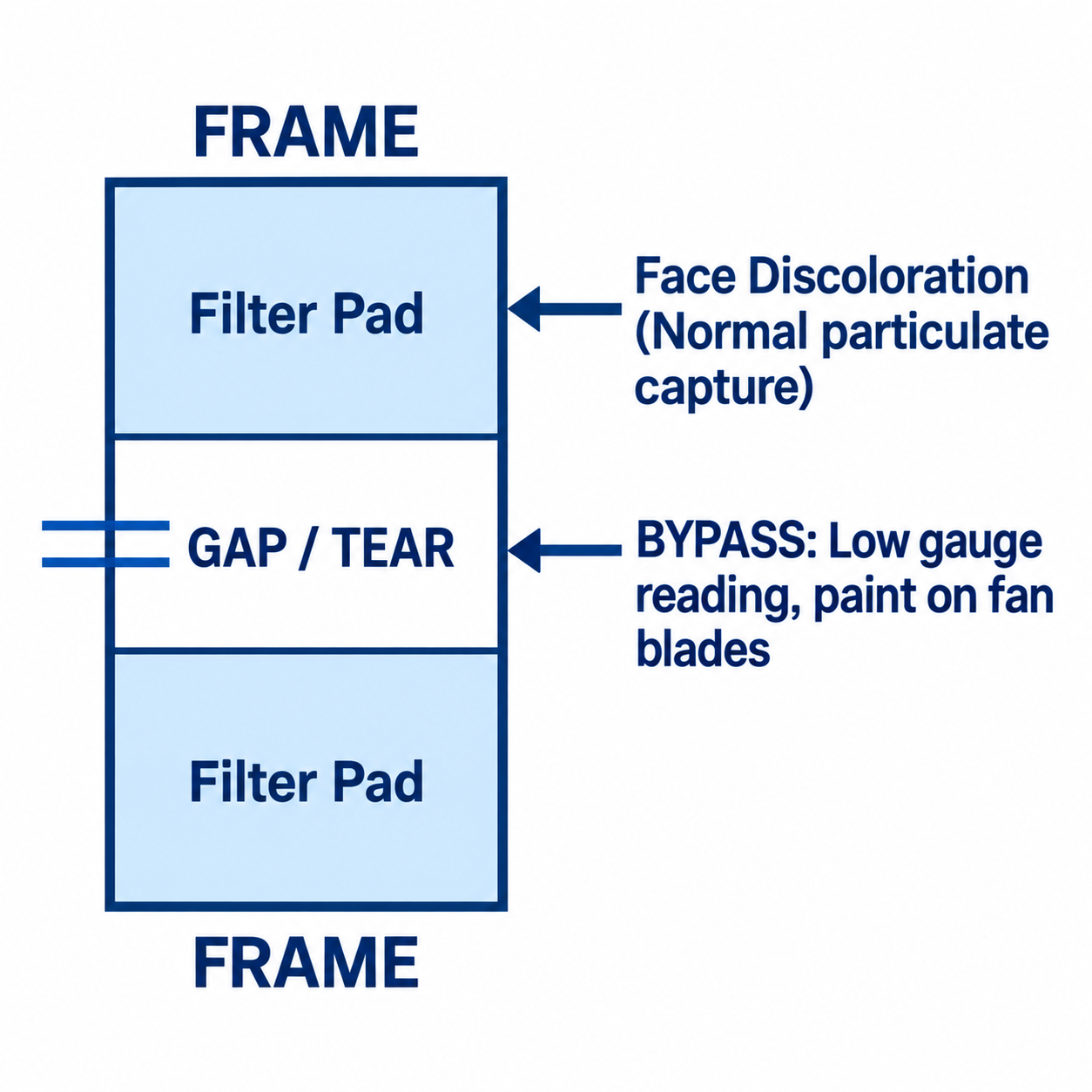
Diagram description
- FRAME
- Filter Pad
- GAP / TEAR
- Filter Pad
- FRAME
- Face Discoloration (Normal particulate capture)
- BYPASS: Low gauge reading, paint on fan blades
- Face Discoloration (Normal particulate capture) → Filter Pad
- BYPASS: Low gauge reading, paint on fan blades → GAP / TEAR
- FRAME
- FRAME
- Filter Pad
- GAP / TEAR
- Filter Pad
- FRAME label above and below one outlined rectangle
- Rectangle contains stacked Filter Pad, GAP / TEAR, Filter Pad sections
- Face Discoloration (Normal particulate capture) left-pointing arrow to upper Filter Pad
- BYPASS: Low gauge reading, paint on fan blades left-pointing arrow to GAP / TEAR; short parallel horizontal lines extend left of GAP / TEAR
- No arrows between pads
Visual and Structural Condition
Examine the face and core of the media:
- Surface blinding versus depth loading: Polyester or fiberglass exhaust arrestors should load evenly throughout the cross-section of the media. If a thick, continuous film of dried resin blinds the front face while the back remains pristine, face velocity or atomization characteristics may need review.
- Tears, pinholes, and punctures: Inspect ceiling diffusion pads for punctures from booth tools, hooks, or air lines. Ruptures can allow particles to bypass the media and affect finish quality.
- Moisture and solvent saturation: Intake filters exposed to weather hoods or unconditioned makeup air can absorb water, causing fiber collapse or mold. Exhaust filters saturated with excessive liquid solvent present fire hazards and structural sagging.
Seating, Fit, and Bypass Risk
Gaps or damaged media can create a bypass path. Inspect fit alongside loading rather than assuming a low gauge reading proves good filtration.
- Check that roll media or pad blankets remain locked firmly in their retaining tracks without sagging in the center.
- Verify that ceiling filter hold-down bars apply uniform compression around the entire perimeter gasket.
- Inspect floor pit grids to ensure grates do not pinch, tear, or shift the primary arrestor pads below them.
- Check downstream plenums for overspray tracks. A clean exhaust plenum does not prove seal integrity; downstream paint deposits are an observation to investigate alongside fit, media condition and maintenance history.
Differential Pressure and Operating Modes
Differential pressure gauges (such as inclined manometers, Magnehelic dials, or digital pressure transducers) measure the static pressure drop across a filter bank. Gauge readings must always be recorded while the booth operates in a known, stable mode.
Consult your equipment-specific control guidance—such as the status screens on a GFS LOGIC 3 panel or local pressure instrumentation—to confirm airflow mode before logging values. Readings can vary with operating mode and airflow; compare them only under documented comparable conditions.
Compare your operating gauge reading against the clean baseline recorded during the last filter change. Detailed change-point criteria are covered in our companion resource on when to replace paint booth filters, but your daily objective is to monitor the trend: a sudden drop or sharp increase warrants investigation of media condition, fit, operating state and the measurement system rather than a presumed diagnosis.
Build an Actionable Filter Inspection Record
An inspection log that records only "OK" provides no diagnostic value when airflow problems emerge. An actionable record isolates the exact filter location, logs quantitative data alongside physical observations, identifies who is responsible for corrective action, and demands a signed-off follow-up. The entries below are fictional record-format examples: their readings, dates and conditions are not change limits, intervals or service instructions. Use the actual equipment and media documentation for triggers and authorized work.
| Date / Shift | Operating Mode | Filter Location & Stage ID | Gauge Reading | Observed Condition & Fit | Action Trigger Reached? | Corrective Action & Owner | Follow-Up Verification |
|---|---|---|---|---|---|---|---|
| Oct 12 / Shift 1 | Spray (100% VFD) | Exhaust Pit - Stage 1 (Fiberglass roll) | 0.44 in. w.g. | Heavy face loading; 1.5-inch sag along south holding rail; paint tracking visible on pit floor | Yes (Pressure drop & physical bypass) | Refer to the authorized media/retention procedure. Owner: M. Davis | Oct 12 / 14:00: Authorized work completed; fit checked; comparable reading recorded as 0.18 in. w.g. Sign: J. Keller |
| Oct 13 / Shift 1 | Spray (100% VFD) | Ceiling Diffusion - Bank B | 0.28 in. w.g. | Uniform coloration; minor perimeter gasket gap at northwest corner clamp | Fit defect requires review regardless of reading | Arrange authorized correction of the fit defect. Owner: M. Davis | Oct 13 / 08:30: Authorized correction and fit verification recorded. Sign: M. Davis |
| Oct 14 / Shift 2 | Bake / Cure (Cycle 2) | Pre-filter Bank - Intake Tower | 0.12 in. w.g. | Clean face; panels firm in tracks; no visible bypass or moisture | No | No action indicated by this fictional entry; schedule per actual requirements. | N/A |
| Oct 15 / Shift 1 | Spray (100% VFD) | Exhaust Wall - Stage 2 (Secondary poly pads) | 0.52 in. w.g. | Surface caking uniform; no tears; reading to compare with the documented media-specific trigger | Record whether the actual specified trigger is reached | If the documented trigger is reached, follow the authorized replacement procedure. Owner: R. Torres | Oct 15 / 17:30: 12 pads replaced. New baseline Delta P: 0.15 in. w.g. Latches confirmed secure. Sign: J. Keller |
Separate raw observations from diagnostic conclusions. Noting "0.44 in. w.g. with sagging rail" records an observable fact. An action decision must then refer to the equipment-specific trigger and authorized procedure; the observation alone does not prescribe roll indexing or clip adjustment. Documenting both gives shop leadership a clear trail if overspray subsequently appears on the exhaust fan.
Close Service Actions and Investigate Chronic Anomalies
Maintenance does not end when new media is set into a frame. The cycle concludes only after physical fit is verified, the booth is test-run under operating conditions, and the service outcome is logged.
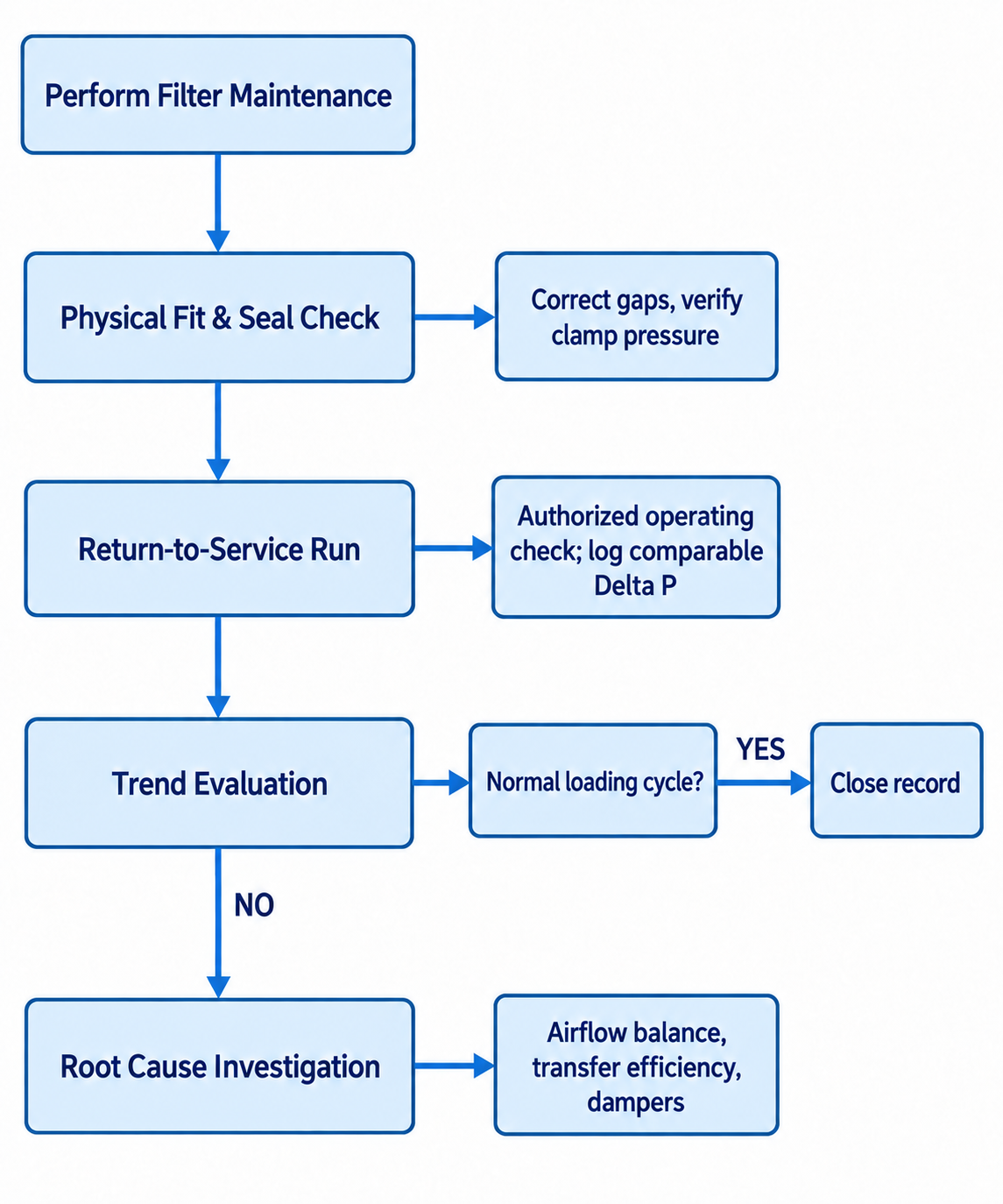
Diagram description
- Perform Filter Maintenance
- Physical Fit & Seal Check
- Correct gaps, verify clamp pressure
- Return-to-Service Run
- Authorized operating check; log comparable Delta P
- Trend Evaluation
- Normal loading cycle?
- YES
- Close record
- NO
- Root Cause Investigation
- Airflow balance, transfer efficiency, dampers
- Perform Filter Maintenance → Physical Fit & Seal Check
- Physical Fit & Seal Check → Correct gaps, verify clamp pressure
- Physical Fit & Seal Check → Return-to-Service Run
- Return-to-Service Run → Authorized operating check; log comparable Delta P
- Return-to-Service Run → Trend Evaluation
- Trend Evaluation → Normal loading cycle?
- Normal loading cycle? → Close record: YES
- Trend Evaluation → Root Cause Investigation: NO
- Root Cause Investigation → Airflow balance, transfer efficiency, dampers
- Perform Filter Maintenance → Physical Fit & Seal Check → Return-to-Service Run → Trend Evaluation → Root Cause Investigation.
- Fit node branches right to Correct gaps, verify clamp pressure.
- Run branches right to Authorized operating check; log comparable Delta P.
- Trend branches right to Normal loading cycle? → YES → Close record.
- Downward Trend-to-Root edge labelled NO.
- Root branches right to Airflow balance, transfer efficiency, dampers.
Return-to-Service Verification
Before clearing a booth for production after a filter service:
- Verify mechanical locking: Confirm every twist clip, compression bar, and retention track is seated. Hand-check the perimeter of each pad to ensure no edges have curled inward during door closure.
- Conduct the authorized operational check: Follow the equipment’s return-to-service procedure and allow readings to stabilize under its specified conditions.
- Record initial clean baseline: Read and log the initial differential pressure on your inspection record. This number establishes the benchmark for measuring future loading.
- Verify retention under authorized conditions: Have qualified personnel perform any operating observation permitted by the equipment documentation, without opening guards or access panels during operation.
Investigating Recurring Anomalies
When filter banks show chronic, abnormal patterns—such as exhaust media loading in three days instead of two weeks, or localized loading directly under one side of the plenum—do not attempt to mask the symptom.
- Do not alter fan speed without cause: Cranking VFD frequencies or adjusting fan sheaves to overcome blinded filters stresses mechanical drives and risks pulling paint solids through saturated media.
- Do not switch to unapproved filter media: Installing looser, less efficient media to lower differential pressure reduces static resistance at the expense of coating your exhaust fan wheel, bearings, and ductwork with overspray.
- Check booth balance and spray technique: Rapid, asymmetric loading often points to improper exhaust damper modulation, clogged intake paths starving the cabin of air, or degraded transfer efficiency at the spray gun.
- Examine building envelope interaction: Facilities with poor makeup air balance can draw negative pressure on the booth cabin, pulling shop contaminants through door seals and overwhelming intake pre-filters.
If differential pressure readings fluctuate erratically or control alarms trigger repeatedly despite fresh media installations, escalate the issue. Complex pneumatic damper controls, burner pressure switches, and VFD control-loop balancing require diagnostics from qualified service technicians using calibrated measurement instruments.
Maintaining predictable airflow across your finishing operations depends on exact-fit media and reliable retention hardware. If you need replacement intake blankets, custom exhaust frames, or primary arrestors matched to your equipment, contact Paint Booth to Request a Quote. Provide your booth make, model, cabin dimensions, and current filter part numbers so the supplier can review component compatibility.